Operations & Compliance
Incident Response Training: Protect Client Data
Learn essential strategies for safeguarding client data in tattoo studios, including staff training, compliance, and incident response plans.
Running a tattoo studio involves more than just artistry, it requires safeguarding client data. Without proper training, your team could unintentionally expose sensitive information to cyber threats. Here’s why it matters and how to protect your studio:
-
Data breaches are costly: The average breach costs $4.88M, and 60% of small businesses close within six months of an attack.
-
Tattoo studios are targets: Small businesses account for 43% of cyberattacks, and studios handle sensitive data like health info and payments.
-
Trust matters: 59% of customers won’t return to a business after a breach.
The solution? Combine staff training with secure tools like Tattoo Studio Pro to reduce risks, comply with privacy laws, and maintain client trust. This article covers practical steps, from spotting phishing attempts to creating an incident response plan.
Data Privacy Laws That Apply to Tattoo Studios
Being aware of data privacy laws is essential for safeguarding both your clients and your tattoo studio. These regulations span federal safety requirements and state-specific privacy laws, making compliance a critical part of running your business.
Federal and State Laws You Must Follow
Tattoo studios typically fall outside the scope of HIPAA because the relationship between tattoo artists and their clients doesn’t meet the criteria for healthcare provider protections under this law. However, that doesn’t mean there are no federal rules to follow. Studios must adhere to OSHA’s bloodborne pathogen standards and CDC health guidelines to ensure a safe environment.
At the state level, regulations vary widely. For example, California enforces strict privacy laws comparable to Europe’s GDPR, while other states may have less stringent requirements. State laws often cover licensing, safety training, and how client data is handled. This includes mandatory bloodborne pathogen training and obtaining parental consent for minors when necessary. These rules emphasize the importance of proper consent management and meticulous recordkeeping.
How Consent Forms and Records Keep You Compliant
Consent forms and thorough recordkeeping are your best tools for staying compliant with these laws. Digital consent forms, in particular, reduce legal risks and help demonstrate compliance with state regulations. By collecting client information digitally, you create a secure and well-organized system that aligns with legal expectations.
Your consent forms should clearly explain what information is being collected, how it will be used, and who will have access to it. If you plan to use client photos or other personal details for marketing, always obtain signed consent. Digital systems make it easier to manage this information securely and efficiently, ensuring your records are both accessible and protected.
What Happens When You Don’t Comply
Ignoring data privacy laws can lead to serious consequences, including hefty fines and legal troubles. Privacy breaches can also hold business associates directly accountable. To avoid these risks, adopt strong compliance measures. This includes secure handling of client data, proper recordkeeping, and adherence to all relevant regulations. Taking these steps protects your business and builds trust with your clients.
What to Include in Your Incident Response Training
Building a solid incident response training program for your tattoo studio means focusing on three key areas that directly impact client data protection. This training should be practical, interactive, and tailored to the everyday risks your studio encounters.
Data Privacy Basics Every Staff Member Should Know
Your team handles more than just tattoo designs, they’re responsible for safeguarding personal, financial, and medical information. This includes client phone numbers, addresses, and signed consent forms. These details should never be left visible when clients are around. Physical records should be securely stored, and access to digital files should be limited strictly to work-related purposes.
Encourage strong, unique passwords for individual accounts and secure all devices, whether it’s a computer, tablet, or phone, using passwords or biometric locks. Ensure devices are kept up-to-date with patches and antivirus software. Most importantly, every team member should have their own login credentials; shared accounts are a security risk.
By mastering these privacy fundamentals, staff will be better equipped to notice and respond to potential threats.
How to Spot Security Threats
Once your team understands data security basics, they need to learn how to recognize and report potential threats. Phishing emails, for instance, are a common tactic used by attackers. Train your team to identify suspicious emails that ask for sensitive information, request login credentials, or include unexpected attachments from unknown sources.
Remind staff that legitimate companies will never ask for passwords or sensitive data through unsolicited emails or messages. Encourage them to report unusual login activities immediately and to use secure, private networks when accessing client information.
Using Role-Based Access Controls in Your Software
Managing access to sensitive data is a cornerstone of effective security. Role-based access controls (RBAC) ensure that each team member can only access the information they need to do their job. This follows the principle of least privilege, minimizing the risk of accidental data leaks and limiting the potential impact of a security breach.
For example, tattoo studio management software like Tattoo Studio Pro can assign different levels of access based on roles. Front desk staff might only need to see appointment schedules and basic contact details, while artists may require access to design files and consent forms. Owners and managers typically need full access to financial reports and administrative tools.
Training should focus on assigning and managing these permissions correctly. Staff should understand that RBAC isn’t just about assigning roles, it’s a structured system that, when paired with clear governance rules, creates a secure and trackable framework for accessing sensitive information.
Roles should be reviewed regularly to reflect changes in responsibilities, ensuring every action is traceable for better security and compliance.
“Implementing these security measures protects both your operations and client data while using Tattoo Studio Pro.”
Make sure your team knows how to monitor access logs for unusual activity, such as unauthorized attempts to view client data. Establish clear procedures for reporting any suspicious behavior right away to keep your studio’s operations and client information secure.
How to Create and Use an Incident Response Plan
Having an incident response plan in place is what keeps damage and disruptions to a minimum when something goes wrong.
Steps to Build Your Incident Response Plan
To create an effective incident response plan, start by choosing a framework that fits your studio’s needs. Frameworks like NIST, SANS, and CISA offer structured approaches tailored to different security priorities. For many tattoo studios, the NIST framework strikes a good balance between simplicity and thoroughness.
Begin by establishing clear security policies. These should outline when and why your incident response plan kicks in. Make sure these policies complement other security measures you already have, like regular data backups and strict access controls. Define what constitutes a security incident by listing examples, unauthorized access, suspicious logins, or stolen devices.
Next, outline your response strategy. Decide whether your studio will focus on rapid containment, full recovery, or a mix of both. The approach you choose should align with your studio’s size and resources.
Clear communication is key during a crisis. Organize contact details for everyone involved, staff, IT support, and even legal advisors. This ensures no time is wasted figuring out who to call when every second counts.
Set up a system to document every step of the response process. This includes logging the initial detection, actions taken, timelines, and the final resolution. Such records are invaluable for post-incident reviews.
Choose tools that meet your studio’s specific needs, like security monitoring software or reliable backup systems. These tools should help you detect and address threats quickly, but they also need to fit within your budget and technical capabilities.
Assign specific roles to team members. For example, designate one person to lead the response, another to handle client communications, and someone else to focus on technical containment. Even in smaller teams, having clear roles helps avoid confusion and ensures nothing is overlooked.
When a breach occurs, put your plan into action immediately to limit the damage.
What to Do During a Data Breach
Your response to a data breach can make all the difference in how much damage is done. The Federal Trade Commission stresses the importance of acting quickly to limit harm.
Start by securing your systems. Take affected devices offline, but preserve them for forensic analysis. Update all passwords for authorized users. If any personal information has been posted online, whether on your website or social media, remove it right away.
Assemble your breach response team, which should include IT experts, legal advisors, and communications professionals. Speak with the person who discovered the breach to get a clear picture of what happened and when.
Prevent further data loss by reviewing your network setup and ensuring service providers have the right access privileges. Secure any physical areas tied to the breach by changing locks, access codes, or other security measures. Remove improperly posted client information from online platforms as quickly as possible.
“Move quickly to secure your systems and fix vulnerabilities that may have caused the breach. The only thing worse than a data breach is multiple data breaches. Take steps so it doesn’t happen again.”, Federal Trade Commission
Develop a communication plan to keep employees, clients, and business partners informed. Assign one person to handle all messaging to ensure consistency.
Legal notification requirements vary, but all U.S. states, along with the District of Columbia, Puerto Rico, and the Virgin Islands, mandate reporting breaches involving personal information. Work with law enforcement to ensure your notifications don’t interfere with any investigations.
If sensitive data like Social Security numbers or financial details were compromised, consider offering affected clients a year of free credit monitoring or identity theft protection.
Recovery and Prevention After an Incident
Once the immediate crisis is contained, shift your focus to recovery and prevention. Data breaches are costly, averaging $4.35 million in 2022, and 60% of small businesses don’t survive more than six months after a major breach. Recovery is essential for your studio’s long-term survival.
Start by restoring your core operations, like client management, appointment scheduling, and payment processing. Set clear benchmarks to determine when recovery is complete, but don’t rush the process. Overlooking vulnerabilities could leave your studio exposed to future threats.
Take time to analyze what went wrong. Since human error is a factor in nearly three-quarters of incidents, focus on identifying gaps in training and procedures. Create a detailed timeline of events, highlighting what worked well and what needs improvement.
Update your security policies based on lessons learned. This could mean strengthening password requirements, refining access controls, or adding new monitoring tools. If physical security was compromised, consider upgrading locks, cameras, or document storage systems.
Prevent future incidents by implementing multi-factor authentication, conducting more frequent staff training, and ensuring regular data backups. Review your network setup to make it easier to contain potential breaches.
Perform regular security audits to catch vulnerabilities before they become problems. Check that your service providers maintain strong security practices and ensure your payment systems comply with PCI DSS standards.
Use the recovery phase to refine your incident response plan. Update contact lists, simplify communication processes, and adjust role assignments based on what you learned. Test these updates through tabletop exercises or simulated scenarios to make sure they hold up in real-world situations.
How Tattoo Studio Pro Protects Your Client Data
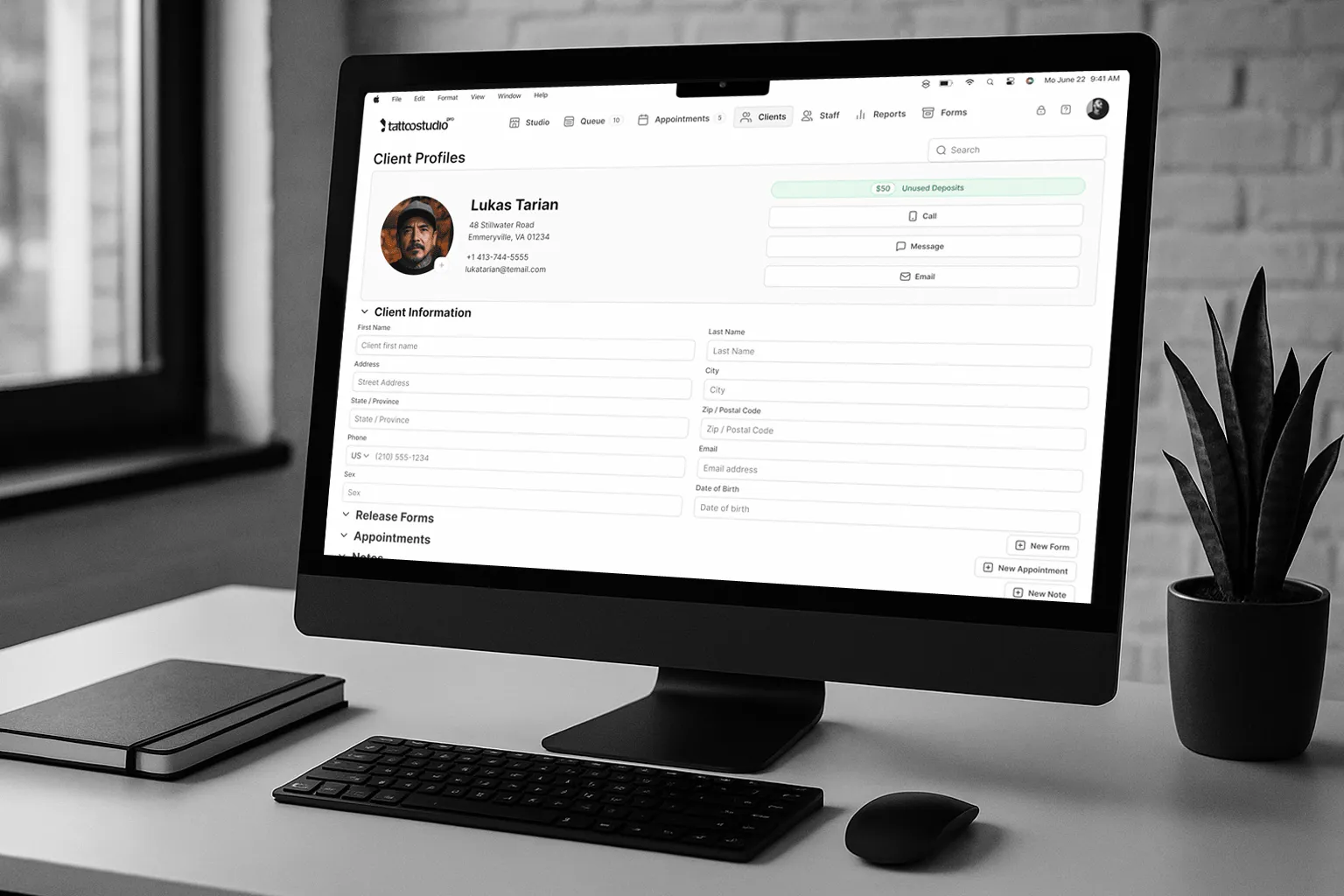
Tattoo Studio Pro goes above and beyond to keep client data safe by combining advanced software with a strong incident response plan. This layered approach minimizes risks and ensures your studio operates securely.
“Your trust and the security of your data are our top priorities.”, Tattoo Studio Pro
The platform is built on Google Cloud, offering top-tier encryption for data at rest and in transit. With 24/7 threat detection and monitoring, your client information is well-guarded.
For payment processing, Tattoo Studio Pro relies on Stripe, which complies with PCI DSS standards. This means sensitive payment details are never stored on the platform, reducing potential vulnerabilities. On top of secure transactions, the system provides strong user controls to protect privacy further.
Setting Up Team Accounts and Access Controls
Role-based access control is a smart way to limit who can see or use specific data. Tattoo Studio Pro simplifies this with predefined roles: Manager, Artist, Staff, and Health Official. Each role comes with specific permissions, ensuring team members only access what they need.
Studio owners and managers have full control over these settings. They can deactivate accounts, remove users, or revoke device access instantly, essential for handling staff changes or security issues.
For shared devices, the platform uses PIN codes, so every staff member logs in with their unique code. This ensures secure access to client data, even when devices are shared among team members.
“Security you can count on, access you control.”, Tattoo Studio Pro
Tattoo Studio Pro also offers a Health Official role, designed specifically for compliance officers or health inspectors. This role provides limited access to the Forms Archive without counting toward your staff user limit.
Every action within the platform is logged, creating a detailed audit trail. This feature is invaluable for compliance reporting and investigating unusual activity.
Managing Digital Consent Forms and Client Files
Tattoo Studio Pro secures digital consent forms with encrypted cloud storage, making them easy to search by client name, date, or session.
The platform includes a form editor, allowing studios to create custom digital consent forms, waivers, and health questionnaires. You can make certain fields mandatory, add options for parental consent, and tailor forms to your specific needs, all within minutes.
“The form editor is a game-changer. I created custom health questionnaires in minutes, and now everything is organized and at my fingertips.”, Alex, Owner of Ink Haven
Legally binding digital signatures ensure compliance, and the system supports multiple languages, helping studios cater to diverse clients while maintaining security.
“Being able to offer forms in multiple languages has helped me connect with more clients and make everyone feel welcome.”, Maria, Artist at Urban Ink
Clients can fill out forms on their own devices or on a studio tablet or desktop. Once completed, the forms are encrypted and stored securely, accessible only to authorized team members.
Tracking Access and Creating Compliance Reports
Tattoo Studio Pro tracks every access event, creating detailed audit trails for compliance and quick investigations. These trails, combined with advanced reporting tools, help studios meet regulatory requirements and address security concerns efficiently.
The platform complies with GDPR and CCPA standards, ensuring data is handled responsibly. It’s also working toward HIPAA compliance, recognizing the need for additional safeguards for certain client health information.
“At Tattoo Studio Pro, we take security seriously. From client privacy to staff permissions, our platform is built to keep your data safe and your studio operations seamless.”, Tattoo Studio Pro
Regular security audits of its Google Cloud infrastructure add another layer of protection. By combining advanced security measures, detailed access controls, and thorough audit trails, Tattoo Studio Pro provides a reliable system for safeguarding client data and managing security effectively.
Data Protection Requires Training and the Right Tools
Safeguarding client data isn’t something you can achieve with a single solution. It takes a combination of thorough training and secure software working hand in hand. Think of it like the health protocols you follow to protect your clients physically, incident response training serves as the digital equivalent, shielding against cyber threats.
Without proper training, your staff could unintentionally become the weak point in your defense against cyberattacks. But with consistent security awareness programs, the risks drop significantly. For instance, phishing click rates can decrease from 32% to just 5% in a year, and some organizations report up to an 80% reduction in successful phishing attempts.
Of course, training alone isn’t enough. Secure software is essential to complement your team’s vigilance. Features like encryption, strict access controls, and continuous monitoring ensure sensitive information stays protected. This is especially critical when you consider that 90% of attacks targeting small businesses involve data or credential theft. Together, training and technology create a strong defense that reduces risks and protects your financial stability.
The financial impact of a data breach can be devastating. The average cost is $4.88 million, a figure that could easily overwhelm a tattoo studio. But by combining proper training and tools like Tattoo Studio Pro, you create multiple layers of protection. While your team focuses on identifying threats, the software handles the heavy lifting on the technical side.
This dual approach does more than just protect data, it builds client trust. When clients feel confident that their personal information is secure, they’re more likely to return and recommend your studio to others. In an industry that thrives on relationships and reputation, that trust is invaluable and directly contributes to your long-term success.
Data protection isn’t just about meeting legal requirements; it’s about fulfilling a professional obligation. Just as you wouldn’t skip bloodborne pathogen protocols, you can’t afford to ignore digital security. By combining ongoing training with reliable software, you create a foundation for strong data protection and maintain the trust that keeps your studio thriving. Consider this article part of our Tattoo Studio Operations Guide, your essential resource for protecting client data, ensuring compliance, and maintaining a secure, professional studio.
FAQs
What should a tattoo studio include in its incident response plan to protect client data?
An effective incident response plan for a tattoo studio should prioritize preparation, detection, containment, and recovery. Start by ensuring your team is well-trained to spot potential security issues and act swiftly. Provide clear, step-by-step instructions for identifying and addressing incidents like data breaches, including how to contain the problem and limit further damage.
The plan should also include communication protocols for informing affected clients, staff, and, when necessary, relevant authorities. Make it a habit to regularly review, update, and test the plan to keep up with new threats. By documenting all procedures, you ensure your team knows exactly how to respond, reducing downtime and maintaining your clients’ confidence.
How can tattoo studios stay compliant with state and federal data privacy laws?
Tattoo studios can ensure they meet state and federal data privacy laws by adopting clear privacy policies that align with regulations like HIPAA and the California Consumer Privacy Act (CCPA). Staying updated on specific state requirements and tailoring practices to meet those standards is crucial.
To protect client information, studios should rely on secure digital tools, such as electronic consent forms and data management systems. Regular staff training on data security protocols and routine updates to privacy practices add an extra layer of protection. Being transparent with clients about how their data is collected, stored, and safeguarded builds trust and helps maintain compliance across different regions.
What training should tattoo studio staff receive to protect client data effectively?
To keep client data safe, tattoo studio staff need proper training on data security best practices. This includes recognizing phishing scams, securely managing sensitive information, and effectively using tools like Tattoo Studio Pro. It’s also crucial for them to be familiar with legal obligations, such as maintaining confidentiality and knowing the steps to take in case of a data breach.
Regularly updating their training and offering refresher courses is key to staying ahead of new security challenges. This approach helps ensure your team stays alert and ready to protect client information from potential risks.