CLIENTS YOU remember.
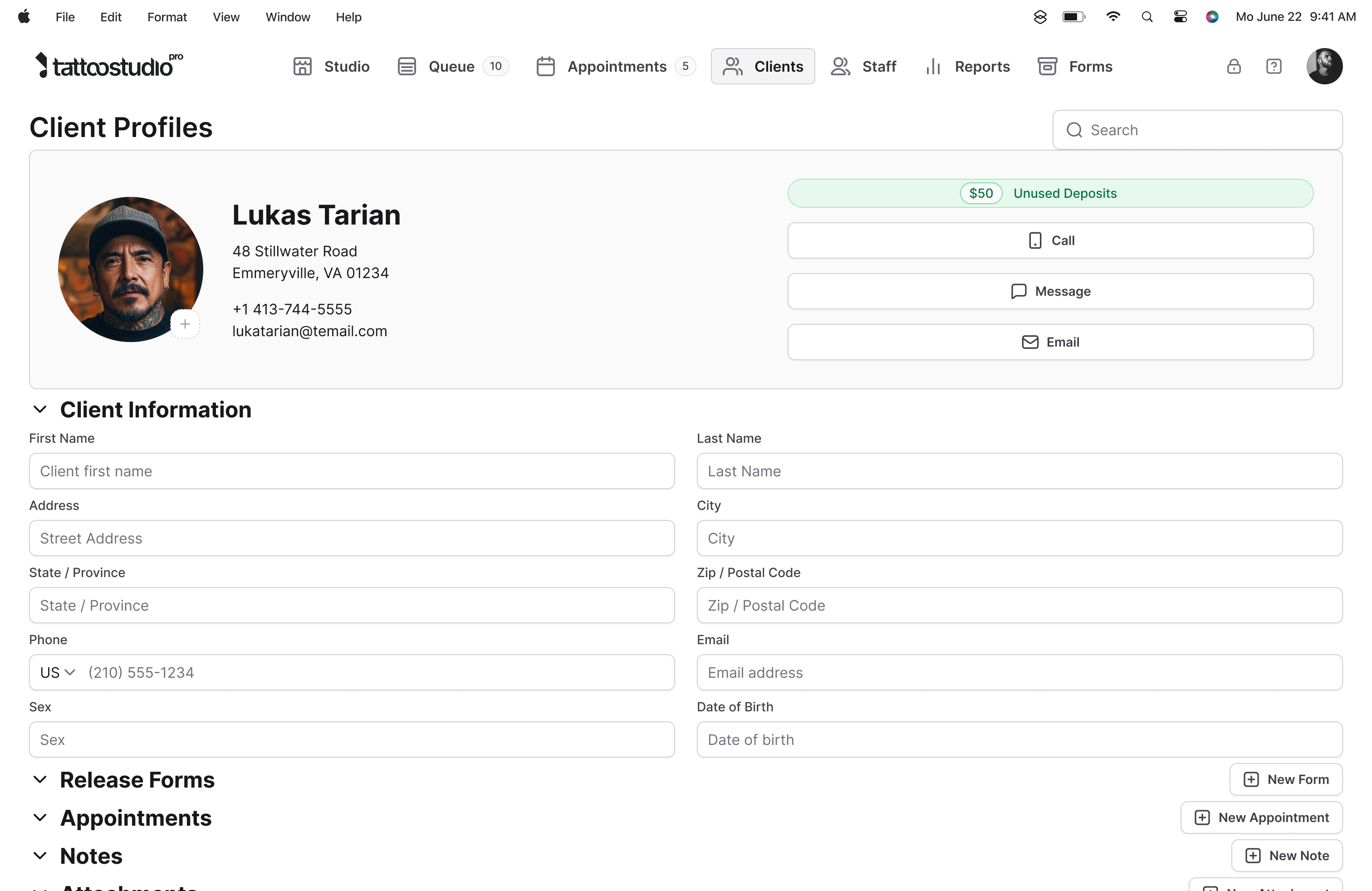
Right now a returning client's contact is in your phone, last year's consent form is in a folder somewhere, what they're allergic to is in your head, and what they paid is in Square. So you go hunting, or you wing it. One file per client that builds itself over years: every session, every signed form, every note, every payment, every photo. Search by name and their whole history is in front of you in three seconds.
A tattoo client is a long relationship.
You tattoo someone at twenty-two. They come back at twenty-five for a sleeve. At twenty-eight they bring their partner. At thirty-two their best friend walks in asking for "whoever did Sarah's piece." Every one of those moments goes better when you remember what you did last time, what they liked, what they were allergic to, and who tattooed them.
Generic CRMs model clients as sales opportunities. A tattoo client is not an opportunity. They are a long-running creative project across years. The record has to hold up that long.
The client profile in Tattoo Studio Pro is the file that grows with them. Nothing gets thrown out. Nothing has to be retyped. Nothing gets lost when a team member leaves.
What the client profile holds.
A file that builds itself
Profiles are created the first time a client books, fills out a form, or lands in your Queue. Contact info flows in from intake. Appointments and forms attach themselves. No manual data entry.
Full session history per appointment
Every past appointment with the date, artist, service, price, and final status: Completed, Cancelled, or No-Show. See exactly what the client spent, across how many sessions, with which artists.
Every signed form attached
Consent forms, waivers, guardian consents, photo releases, aftercare acknowledgments. All stored against the profile as signed PDFs you can pull up in seconds, long after the paper version would have been lost.
Health alerts that follow the client
Documented allergies or conditions surface as a red Health Alert badge on the profile header, in the Queue, and on the appointment card. Any artist touching the client sees it before they start.
Deposits and payment history
Total deposits paid, payment history across sessions, and what each visit cost. Reference the full money picture without leaving the profile.
Notes, preferences, and team access
Your running notes on style preferences, skin sensitivity, or anything else worth remembering. Accessible to team members with the right role permissions, updated live across devices.
"My client list is scattered across three apps. I'm not re-typing all that."
You shouldn't have to. Two things handle it. Going forward, profiles build themselves: the first time a client books, fills out a form, or lands in your Queue, the file appears and the details attach automatically. Nobody sits there doing data entry.
And the back catalog? That's on us. Free data migration is part of the trial: export your client list from whatever you're using now, send it over, and we import it, appointment history and consent forms too, as far as the old platform will hand them over. The same door swings out, by the way: ask us for your data any time and we give you the full set. You're not getting locked in here.
What's new
What just landed in the profile.
Three small additions you'll feel the next time a repeat client books.
-
Status column on the appointments table.
Past appointments now show a status badge for each one. Completed, Cancelled, or No-Show at a glance.
-
No-show count badge on the profile header.
Clients with one or more no-shows show a red count badge in the header. Repeat offenders surface themselves before you book them again.
-
Payment method in CSV export.
When you export reports on web, the payment method field is now included so you can see how each session was paid at the row level.
What the client profile is not.
It is not a marketing CRM. No email blast tools, no segmentation, no campaign automation. It is the operational record of the relationship, not a sales machine.
It is not a public-facing client portal. Clients do not log in to see their own profile or past appointments. Profiles are for your team.
It is not a medical records system. Health questions are captured on the intake form to keep your artists safe. They are not a substitute for your client's actual medical history.
Quick answers.
Are signed forms really attached to every profile?
Yes. Every completed consent form, waiver, or health questionnaire links automatically to the client's profile as a signed PDF. Viewable any time, long after the session.
Can I search for clients quickly?
Yes. Search by name from the Queue, the client list, or the appointment screen. Results update as you type.
Who on my team can see client profiles?
Owner, Manager, and Artist roles have access. Staff and Health Official roles do not. Configurable per team member.
Can I export my client database?
Yes. Settings has a Backup section with an Export Client Data option that produces a CSV. Your data stays yours.
Is this included on every plan?
Yes. Every Tattoo Studio Pro plan includes every feature. Plans differ only by number of team members.