ONE SCREEN FOR YOUR floor.
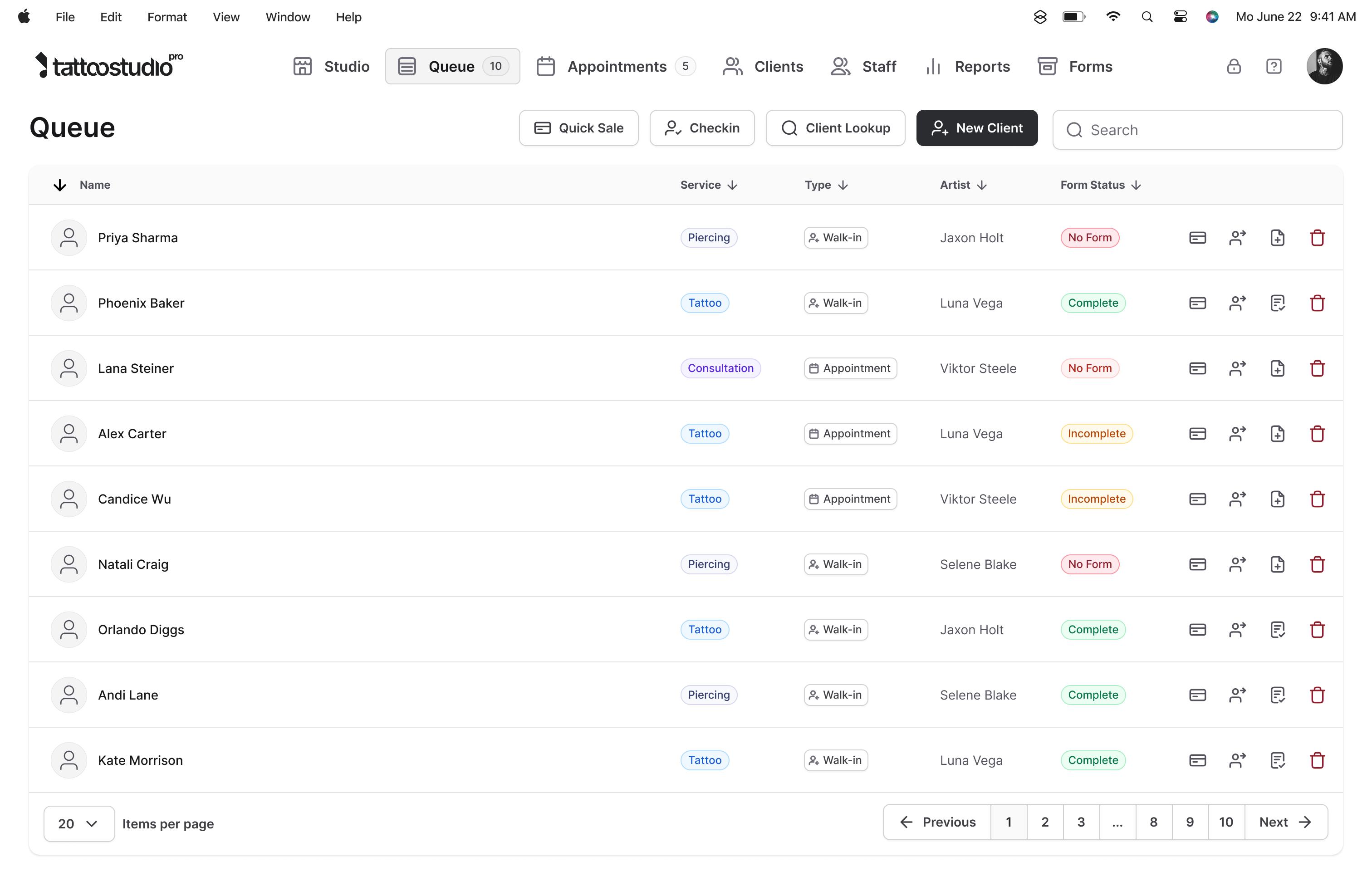
It's 2pm. One client's three hours into a back piece, two walk-ins are at the counter, someone's filling out a waiver on the tablet, a deposit just pinged, and the front desk is flipping between a calendar tab, a forms dashboard, and Square trying to figure out who's ready for checkout. The Queue is the one screen that holds all of it. Check-ins, forms, sessions, checkout. Built for tattoo shops, not salons.
You're running the floor out of three tabs and a clipboard.
Tattoo shops are not salons. A booked client is in the chair for three hours. A walk-in shows up mid-session. Someone else is filling out a waiver on the tablet. A deposit pings in. Another client is ready for checkout. If the schedule lives in one app, the forms in another, and payments in a third, the front desk spends the day stitching them together by hand and still gets caught off guard.
Calendar-first software treats walk-ins like a rounding error. The Queue treats them like a normal Tuesday.
Open the Queue and you see your day as it actually is: who is in the shop, what state they are in, and what they need next. No tabs to hunt through. No guessing. The schedule, the form status, the session timer, and the checkout button are all on the same row.
What the Queue does for you.
Check-ins that do themselves
Clients use a link in their reminder text or scan a QR at the counter and check in from their phone. Walk-ins land in the Walk-Ins tab; returning clients auto-match against their file.
Form status from across the shop
Green is complete, orange is in progress, red is not started. You know who is ready for checkout without asking. Artists stay on their work.
Session timers and health alerts
Time in the shop is tracked automatically. Anything running long shows in red. Documented allergies and conditions get a Health Alert badge you cannot miss.
Checkout built into the row
One tap from the Queue, add services, products, and tips. Card through Stripe, in person on a reader, or cash. The visit is recorded and the row clears automatically.
Quick Sale for walk-up cash
Aftercare, merch, small cash purchases where there is no client record to create. One button, straight to checkout, recorded in reports.
Two stations, one shared view
The Queue updates in real time across devices. Front desk and an artist at a second station see the same live floor.
What's new
The Queue, quieter.
Five updates aimed at the busy mid-day check-in rush.
-
QR code for walk-in check-ins.
Print it, put it on the counter, let clients check in from their phone.
-
Walk-Ins tab.
What used to be called "Online Forms" is now clearly labeled. Same workflow, clearer language.
-
Auto-matched returning clients.
Once the Queue has seen a walk-in's contact info, it remembers. Next time skips the lookup.
-
No-show protection.
If an appointment was marked no-show, the Queue will not let you accidentally check the client in again.
-
Faster loading.
The check-in modal opens noticeably faster, especially on busy days.
"My artists won't use it."
Fair worry. Most studio software is genuinely awful to use, and artists have been burned by tools that made their day harder, not easier. So the Queue is built around what they already do during a shift: check a client in, see who's mid-form, watch a session timer, ring someone up. Nothing to learn that they weren't already doing in their head.
Everyone gets their own login with the access level you set. The floor view is the same on a tablet at the station and on the web at the front desk. And when you start, Paul walks through team rollout on the onboarding call: who needs what access, how to introduce it, where shops usually trip. Most studios are running the Queue on the floor the same week.
What the Queue does not do.
The Queue is your internal operational view. It is not a customer-facing queue system with ticket numbers, text-when-ready notifications, or public wait-time displays. If your studio needs those, a dedicated queue management tool is the better fit.
The Tattoo Studio Pro Queue is built for studio operations: check-in, forms, sessions, and checkout.
By the numbers
One screen. Everything on it.
Quick answers.
Do clients have to check in online, or can I add walk-ins manually?
Either works. Online check-in through a link or QR code is the fastest path, but the Queue has one-tap buttons to add a walk-in, look up a returning client, or create a new client on the spot.
My shop is walk-in heavy. Is the Queue still the right fit?
Especially then. Most studio software is calendar-first and treats walk-ins as an afterthought. The Queue puts walk-ins and booked appointments on the same view, so a busy Saturday with no appointments at all still runs cleanly. Walk-ins land in their own tab, returning ones auto-match against their file, and checkout is one tap from the row.
Will my artists actually use it?
The Queue is built around what artists and front-desk staff already do during a day, so the muscle memory transfers fast. Everyone gets their own login with the access level you set, the floor view is the same on tablet and web, and Paul covers team rollout on the onboarding call if you want a hand with it. Most studios are running it on the floor the same week they start.
Can two people use the Queue at once?
Yes. It updates in real time across devices. Front desk on a laptop and an artist at a second station see the same live floor, no refresh.
Is the Queue on every plan?
Yes. Every plan includes every feature. You pay for team size, not unlocks.
Does it work on mobile?
Yes. The mobile and web screens are nearly identical. Quick Sale, Check In, Client Lookup, and New Client all work from both.