STOP chasing DEPOSITS.
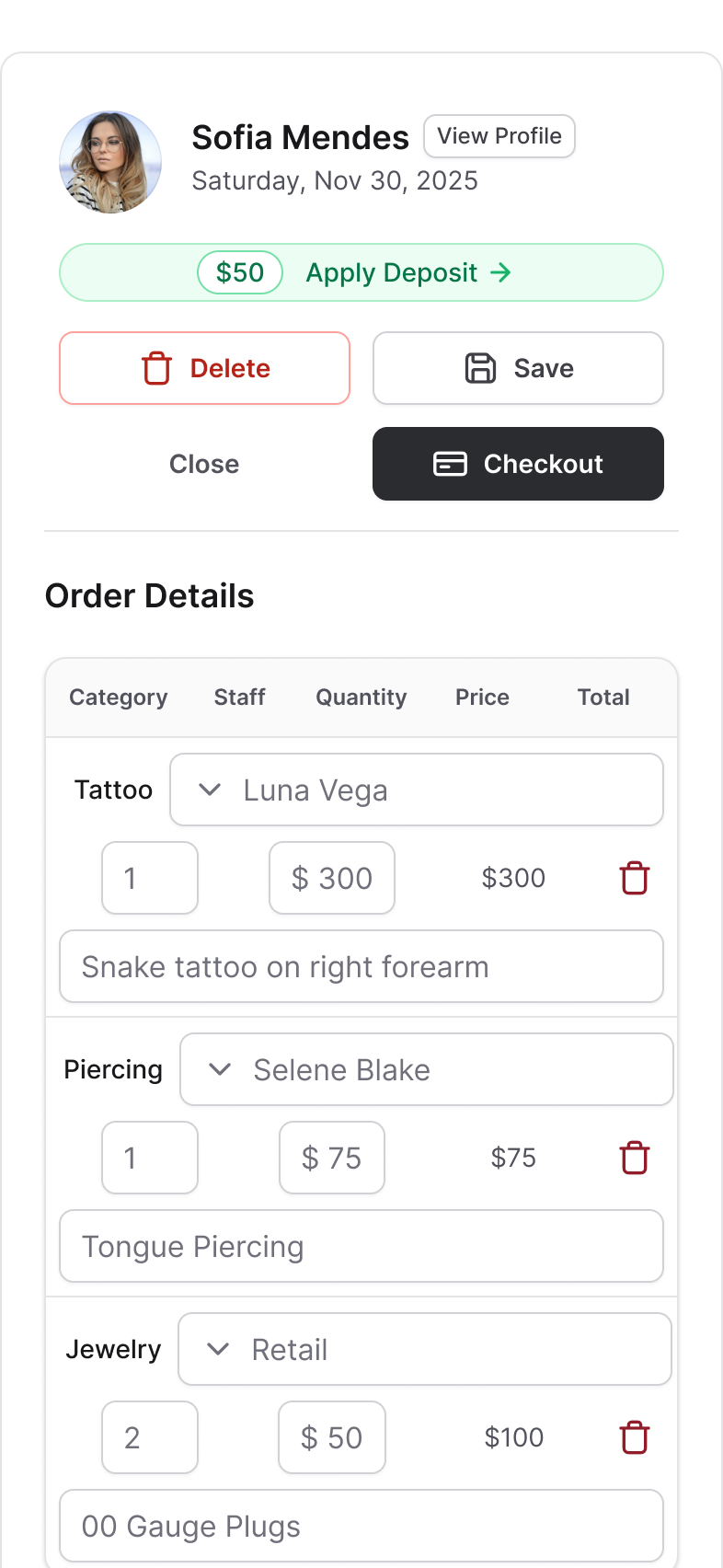
A hosted deposit link ships with every booking confirmation. Clients pay on their phone through Stripe. The appointment auto-confirms the moment the money clears. No Venmo screenshots, no "did you get it?" follow-ups.
Every studio says "we require deposits." Few of them actually do.
The posted policy says "non-refundable deposit required to book." The reality is Venmo requests sent from a personal phone, screenshots asking "did this go through?", paper receipts in a drawer, and a Sunday afternoon trying to reconcile whose deposit went where. Or worse: deposits are technically optional, so clients skip them, and the no-show rate never moves.
A deposit policy only works when collecting the deposit is the easiest path for the client. That is the job.
How it works.
Set the amount once
In Settings under Payments, set a fixed deposit amount. From that point on, every new appointment generates its own unique link automatically. No per-client setup.
Sent in the booking confirmation
Drop the DEPOSIT_LINK variable into your booking confirmation template. It lands in every confirmation text the moment you book. No email, no follow-up call.
Clean hosted checkout
The link opens a public deposit page with your studio name and a Pay Deposit button. No login. No account creation. Stripe handles the actual transaction.
Appointment confirms itself
When the deposit clears, the status flips from Awaiting Deposit to Confirmed automatically. The amber calendar badge disappears the moment it is paid.
Recorded against the client
Every deposit ties to the client profile and rolls into their total deposits. At checkout, you decide whether to apply it to the session or treat it as a held fee.
Expired and invalid links handled
Expired links, already-paid links, and invalid links all show your studio contact info instead of a dead end. Nothing leaves the client confused.
"But my clients would rather just Venmo me."
Some will. Most won't, once it's a clean link in the same text that confirms their appointment. Nothing to download, no account to make, no DM thread to dig through. They tap Pay Deposit, the card runs through Stripe, and the appointment confirms itself. For a lot of clients that's less awkward than asking a tattoo artist for their Venmo handle, and a lot harder to "forget."
You don't have to make it the only option, either. In-shop cash deposits still work the way they always have; you just record them at checkout instead of through the link. Most studios that switch the link on stop hearing "did it go through?" within the first week.
What's new
Deposits, end to end.
Set the amount once. Every booking carries its own link.
-
Online Deposits setting.
New section under Settings, Payments. Appears once your Stripe Connect account is complete.
-
Auto-generated links.
Every new appointment gets its own unique, one-time link with no manual setup.
-
DEPOSIT_LINK variable.
A template variable for your booking confirmation SMS. Drop it in once and every confirmation carries it.
-
Awaiting Deposit badge.
Amber calendar badge for pending deposits that disappears on payment.
-
Auto-confirmation.
Appointment status flips to Confirmed the moment the deposit clears.
What it does not do.
It is a flat studio-wide amount, not a percentage of the quoted session cost and not different per service. If your piercings take a smaller deposit than your tattoos, this is a limitation to know about. Per-service deposits are on the roadmap.
It does not support in-person deposit collection recorded inside the deposit flow. In-shop cash deposits still work, you just track them through your regular checkout rather than the online deposit page.
Refunds happen through your Stripe dashboard, not inside Tattoo Studio Pro.
Quick answers.
What amount should I charge?
Whatever your policy calls for. Most studios land between $50 and $100 for standard work, higher for large projects or long booked-out artists. The system holds one flat amount, so pick what works for the majority of your appointments.
Is Stripe required?
Yes. Online deposits run through your Stripe Connect account, which is the same account that powers the rest of Tattoo Studio Pro's payments. Once Connect is set up, Online Deposits appears under Settings.
What if the client never pays the deposit?
The appointment stays in Awaiting Deposit with an amber badge on the calendar. To see every one of them at once, open Appointments in List view, set the range to the next 30 days and switch on awaiting-deposit-only. That is your chase list: who owes you, for when, with their phone numbers right there and clickable. Managers can export it to CSV from the web app if you would rather work through it away from the screen. You can cancel, call, or let the reminder sequence nudge them. Nothing happens without your input.
Does the deposit count toward the final bill?
That is your call at checkout. The deposit is recorded against the client's total deposits in their profile. You decide whether to apply it to the session total or treat it as a held fee. The system records the movement either way.
Will my clients actually pay online?
Most do, once it's a clean link in the same text that confirms their appointment. No app to download, no account to make. For a lot of clients tapping Pay Deposit is less awkward than asking a tattoo artist for their Venmo handle. You can still take cash deposits in person, you just record those at checkout instead of through the link.