SQUARE DOESN'T KNOW WHO THEY are.
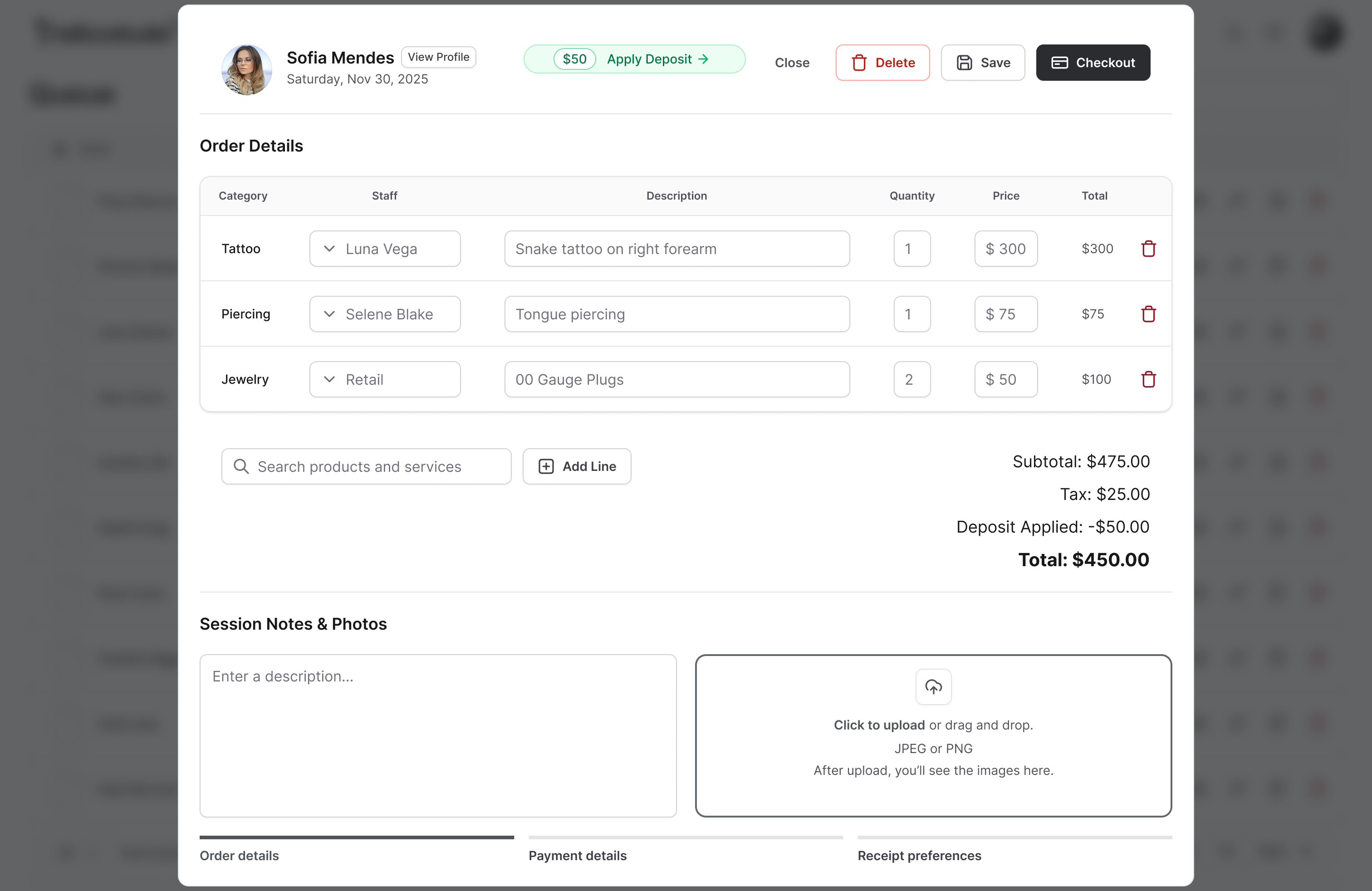
A client pays through your card reader and the sale disappears into a payment app that has no idea they're a client. The deposit you took on Venmo lives somewhere else entirely. At the end of the night you're reconciling three tools to work out what the day actually made. The Point of Sale in Tattoo Studio Pro is the checkout step built into the same screen the session ends on, so the payment lands on the right client, the right artist, the right deposit, the first time.
The POS bolted onto your booking app doesn't talk to it.
Here's the most common setup we see: a booking platform for appointments, Square stapled to it for checkout, Venmo or cash for deposits, and a spreadsheet underneath trying to hold it all together. The booking app doesn't know what the client paid. The card reader doesn't know they had an appointment. The deposit sits in a third place. Every tool sees a slice of the transaction; nothing sees the whole client.
The Point of Sale in Tattoo Studio Pro is not a separate app stapled on the side. It is the checkout step built into the same screen the session ends on: the Queue. Hit Checkout on the client's row, add services and products and the tip, take the card. The payment attaches itself to the right client, the right appointment, the right artist, the right deposit, automatically. Nothing to reconcile at close because nothing was ever separate.
What the POS does for you.
Queue checkout in one tap
Hit Checkout on the client's row in the Queue. Add services from your catalog, retail products, and tips, then credit any deposit they already paid. Process payment. The client is removed from the Queue and the appointment status flips to Completed automatically.
Deposits handled up front
Deposits collected at booking are remembered. When the session checks out, the deposit is already recorded against the client's total. How deposits flow end to end lives on the Online Deposits page.
In person or online, one flow
Register a counter reader (S710, S700 or WisePOS E) on web or pair a Bluetooth M2 to your phone, and take contactless, chip and swipe right inside checkout, with the tip prompt on screen on the counter readers. Or send them to a hosted Stripe page. Visa, Mastercard, Amex, Apple Pay and Google Pay, plus cash recorded in the same flow. Payment method lands on every row of your reports.
Quick Sale for walk-up cash
Aftercare, merch, small walk-up cash sales where there is no client to create. One button, straight to checkout, recorded in reports. A generic Quick Sale customer keeps it clean.
Every transaction ties to the client
Payments, deposits and tips all link to the client profile. Pull up a client and see their total spend across every session, every artist, every payment method. No spreadsheet needed.
Tips broken out by artist
Tips are captured during checkout and tracked separately from commissions in your reports. Artists see what they earned in tips without anyone reconstructing it from card slips.
"I've had Square for years. Switching payments sounds like a headache."
Fair. Money plumbing is the last thing you want to break. So here's the honest shape of it: card payments in Tattoo Studio Pro run through Stripe, and Stripe setup is a few minutes once your business info is in front of you. Your past Square history stays in Square, where your bookkeeper can still get to it. You don't migrate transactions; you just start ringing new sales up in the system that already has the client, the appointment, and the deposit attached.
And you don't have to flip a switch on day one. The 30-day trial runs alongside whatever you're using now. Set up Stripe, ring up a few real sales, watch them land on the client profile and in your reports, and decide from there. If you want a hand wiring it up, the onboarding call is with Paul, the founder, who'll walk through your actual setup with you. He takes around 20 of those a month.
What the POS does not do.
It is not payroll. It tracks artist commissions and tips cleanly, but cutting paychecks, withholding taxes, and issuing W-2s or 1099s is a job for a dedicated payroll service. The commission data from Reports is the input your payroll tool wants.
It is not a separate Stripe dashboard. Refunds, disputes, and payout details live in Stripe. Tattoo Studio Pro is where the transaction starts; Stripe is where it finishes.
It does not lock you into hardware you have to buy from us. Card-present payments run through Stripe Terminal, so you can take chip and tap in person with a Stripe reader bought directly from Stripe, or just use the contactless wallets your clients already carry. See the full hardware compatibility list for supported readers and what you do not need.
Quick answers.
Do I have to stop using Square?
For checkout inside Tattoo Studio Pro, yes: card payments run through Stripe so the sale can attach itself to the client, the appointment, the artist, and the deposit. Your old Square history stays in Square where your bookkeeper can still get to it. You're not migrating transactions, you're just ringing new sales up in the system that already has the rest of the picture. The trial runs alongside whatever you use now, so you can test it before committing.
What payment methods are accepted?
Credit and debit cards, Apple Pay, and Google Pay through Stripe. Cash is recorded through the Quick Sale flow or at checkout as a payment method.
What fees apply?
Stripe's standard processing fees (2.9% and 30 cents per transaction for US cards; see Stripe for international rates). Tattoo Studio Pro does not add a markup on top.
Can I track tips?
Yes. Tips are captured during checkout and broken out by artist in reports, separate from commissions. Artists see what they earned in tips without anyone reconstructing it from card slips.
Can clients pay remotely?
Yes. Deposits are collected online through the booking confirmation SMS. In-studio checkout runs on your own device, whether that is the counter tablet or a laptop at the desk.
Is Stripe required?
Yes. Stripe Connect is how all card payments in Tattoo Studio Pro flow. Setup takes a few minutes once your business info is ready, and the onboarding call with Paul can cover it if you want a hand.
What hardware do I need?
Very little. Tattoo Studio Pro runs on any modern tablet, phone, or computer, plus the iOS and Android apps. The only optional hardware is a card reader for in-person chip and tap payments, and it works with four Stripe Terminal readers (from $59) you buy directly from Stripe, with Apple Tap to Pay on the way. You do not need a receipt printer, cash drawer, or barcode scanner. See the full hardware compatibility list for details.