EVERY NUMBER, NO spreadsheet.
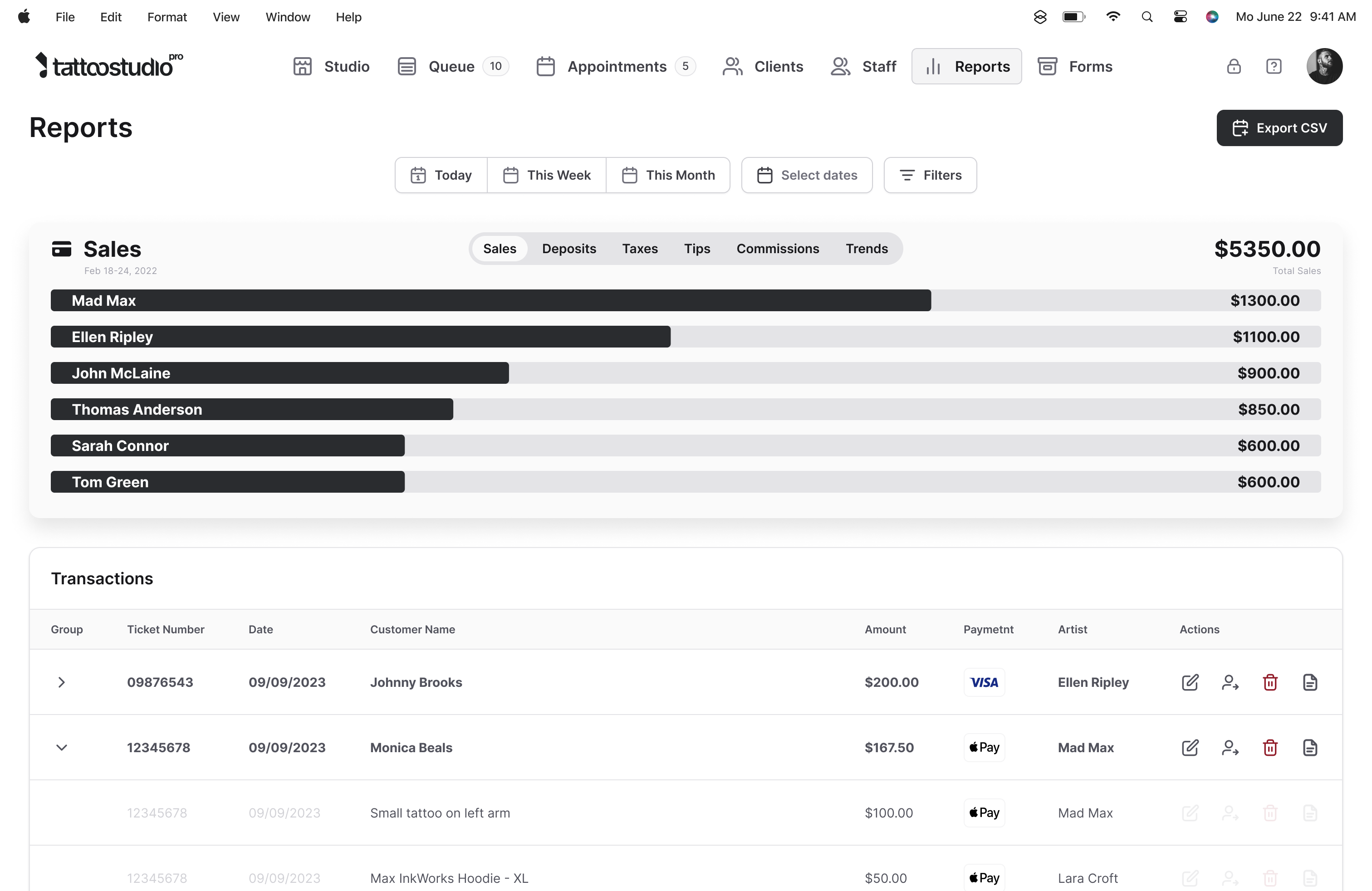
Sales, commissions, tips, deposits, retail, and taxes. Filtered by artist, date, service, or payment method. Exported to CSV for your bookkeeper in thirty seconds. Every number flows in from the work you already did today.
Nobody opened a tattoo shop to run a spreadsheet.
End-of-day spreadsheet updates. Commission math on the back of a receipt. Tips tracked in a notes app. A monthly reconciliation that takes half a Sunday. Tax season that requires pulling numbers from three different places.
You did the work the moment the payment happened at checkout. Reports is the part where that work pays you back: every transaction already classified, already attached to the right artist, already ready to filter, chart, or export.
What the reports give you.
Sales the way a tattoo shop earns
Total sales by artist, by service, by product, so retail like aftercare and merch pulls apart from tattoo revenue with a filter. You can see what is driving the business and what is not in thirty seconds.
Artist commissions, tips separated
Clear earnings summaries for each artist: their commissions and their tips. No manual allocation, no "what did Dave earn on Tuesday" email. The Point of Sale tags each sale to the artist at checkout, and Reports sums it up.
Deposits tracked end to end
Every deposit collected at booking, every deposit applied to a completed session, and every outstanding deposit. You can see the float at a glance.
Taxes and tips for bookkeeping
Sales tax collected, tips earned, broken down how your accountant needs them. Pull a date range, apply filters, export to CSV. What used to take a weekend takes one screen.
Visual trends over time
Dynamic charts for sales, commissions, and traffic across days, weeks, or months. Spot the week your bookings dipped, see which month a new artist ramped, compare this quarter to last.
CSV export in thirty seconds
Export the transactions behind whatever you have filtered to, for any date range, as a CSV that opens in Excel or Google Sheets and goes straight to your bookkeeper. On web, payment method is on every row, so card totals reconcile against your bank deposits and cash pulls out on its own.
By the numbers
Every number, already classified.
"My bookkeeper has their own system. I'm not switching mid-year."
You don't have to upend anything on their end. The export is a plain CSV with a row per transaction, payment method on every line, and the columns your accountant already works with. It opens in Excel or Google Sheets, or it just gets emailed over the way your old reports did. Nobody has to relearn a thing.
And the trial runs alongside whatever you've got now, so you're not betting tax season on a switch. Set Tattoo Studio Pro up, run real sales through it for a few weeks, pull a CSV, hand it to your bookkeeper, and see if it's cleaner than what they get today. Most of them tell you it is. If you want help wiring up the export, the onboarding call is with Paul, the founder; he takes around 20 a month.
What reports do not do.
This is tattoo-industry financial tracking, not payroll. Tattoo Studio Pro does not calculate wages, withhold taxes, issue paychecks, or generate W-2s or 1099s. For that, you want a dedicated payroll service.
What Reports does well is give you the commission and tip data by artist, cleanly, so whatever payroll tool you use gets accurate inputs. Most studios run payroll once or twice a month and the CSV export is what their accountant wants.
Quick answers.
What exactly can I see?
Seven reports over the same transactions: Sales, Taxes, Deposits, Trends, Commissions, Tips, and Payouts, the last combining commissions, tips and salary into what each person is actually owed. Filter any of them by artist, service, product, payment method, or date range.
Can I export to CSV?
Yes. The export gives you the underlying transactions for your current filters and date range, one row each with the payment method included. It is a plain CSV, so it opens in Excel or Google Sheets and your bookkeeper can work from it directly. There is no direct accounting-software integration, and no plans to pretend otherwise.
Does this replace my payroll system?
No. Reports gives you the data to run payroll accurately in whatever payroll tool you use. It does not cut paychecks itself.
Can I see trends over time?
Yes. Charts show sales, commissions, and other metrics across days, weeks, or months. Compare periods side by side.
Are reports on every plan?
Yes. Every Tattoo Studio Pro plan includes the full reporting suite.